Want an email when this course is scheduled in your province? expand_more
PICO NVH: tracing noise and vibration sources in vehicles
cars timer 2-day course assignment certificate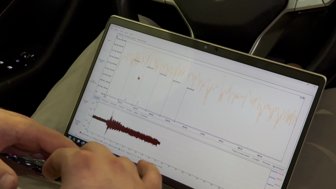


Course overview:
This course covers modern, professional methods for diagnosing vehicle noise and vibration with the PICO NVH tool. You will learn the whole process of tracking down a problem the customer reports: interviewing the customer properly, choosing the right measuring tools, analysing the results and locating the source of the fault.
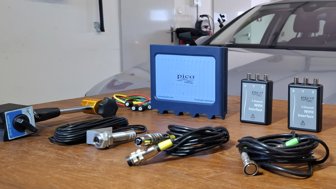
You will learn how to talk to the customer so that you pin down the symptoms and the conditions in which the problem occurs. You will also get to know the measuring equipment needed to diagnose noise and vibration from the vehicle's various systems, such as the running gear, drivetrain and suspension, including in electric and hybrid vehicles.
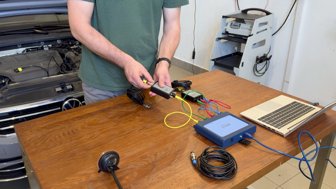
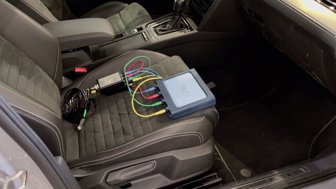
A key part of the course is choosing the right sensors for the symptoms reported and where the problem occurs. You will also learn to fit the measuring equipment in the vehicle so that the results are reliable and repeatable.
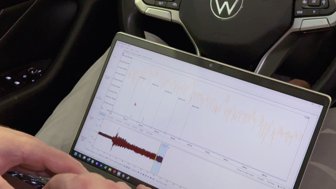
In the practical part of the course, you will learn to use and configure the PICO software for each type of measurement. You will start and stop measurements, save the results as graphs and audio files, and use analysis tools such as markers to pinpoint characteristic points on the graphs.
The final stage is analysing and verifying the measurement results. You will learn how to interpret the data to locate the source of the fault, and how to plan the next diagnostic steps if more measurements are needed to pinpoint where the problem lies.
The course combines theory with practical diagnostic examples, so you can put the methods straight to use in your everyday workshop work.
Every participant gets an individual 5% discount on a PicoScope NVH kit.
On this course:
- find out what equipment you need to buy to take measurements such as:
- vibration from the running gear
- vibration from the drivetrain
- noise from the suspension
- noise entering the passenger compartment
- choose the right sensors to take the measurements the problem calls for
- learn to install and configure the PICO software for the type of measurement you want to take
- learn to fit the measuring equipment in the car
- learn to use the PICO software: starting and stopping a measurement, saving it (graphs and audio files)
- find out how to verify measurement results to locate the fault, or to take further measurements if they are needed to pinpoint exactly where the fault lies
Course outline:
- Introduction to NVH diagnostics: the basics of noise and vibration, typical symptoms in vehicles
- Questioning the customer at service reception and in the workshop: question checklists, identifying symptoms (driving and drivetrain vibration, suspension and ambient noise), planning the diagnostics
- PicoScope NVH
- Pico NVH kits
- accelerometers
- microphones
- OBD interfaces
- Installing and setting up PicoScope NVH
- installing the software
- connecting the device and the sensors the measurement needs
- measurement settings for each type of measurement
- Choosing the right sensors for the measurement the fault calls for:
- accelerometer for vibration
- microphone for noise
- best fitting points and techniques
- Using the Pico NVH software
- starting a measurement
- saving graphs and audio files
- exporting data
- Road test, verifying and analysing the results
- confirming the symptoms
- collecting data in real driving conditions
- analysing the data and doing the calculations needed to find the cause
- Next diagnostic steps: changing the setup (sensors/locations) or ruling out the fault
Requirements:
- this course has no special requirements
Price (excl. VAT):
- 3000 PLN
KFS funding (National Training Fund): usually 70-90% of the price of in-person and online courses
You can get funding from the Krajowy Fundusz Szkoleniowy (National Training Fund, KFS for short) through your Powiatowy Urząd Pracy (PUP, the local job centre). It is open to employers, their employees and contractors, and to self-employed people with no staff. The condition is that contributions to the Fundusz Pracy (Labour Fund) have been paid for at least 6 months before you apply (or that you are exempt from paying them by law).
To get funding, call the Powiatowy Urząd Pracy for the area where your business is registered (list of district labour offices in Poland) and find out:
- whether KFS funding is available (and if not, when it can be expected)
- whether there is an approximate amount available per employee
- how to get the funding
- by when the course must take place
- by when the quote and the application must be submitted
The funding application must be filled in and sent online, from an account on the praca.gov.pl portal. Our quote must be attached to it. Once you have sent all the documents, we suggest calling the office to ask when it will decide on your application. If the application is approved, you will be told by email or someone will phone you (this depends on the job centre).
Once your application has been approved, just give us a call: we will confirm the date and the details of the course.
BUR funding (Development Services Database): usually 50-80% of the price of in-person and online courses
Funding is available in every province for micro, small and medium-sized businesses and their employees, and for private individuals, when they sign up for a course through the Baza Usług Rozwojowych (BUR).
If you already have a BUR account, you can go straight to the search page and sign up for the course you have chosen.
If not, you will find some helpful information below.
Each province (or, more precisely, its operator) decides for itself who can get funding, how much and when it accepts applications, but there is a general procedure to follow.
- Go to the funding section of the BUR website and, under "Programy regionalne" (regional programmes), choose the province where your company is registered or, if you are a private individual, where you study or live.
- Find the operator for your area, call them and ask how to get funding. You will certainly need to:
- sign an agreement with the regional operator,
- create an account in the BUR.
- Sign up for the course through the BUR, quoting the "ID Wsparcia" (support ID) number agreed with the operator.
- If the course you are interested in is not scheduled in the BUR, call us on (+48) 510 566 088 and tell us which course you would like to sign up for. We will set a course date and schedule it in the BUR.
Anyone who meets the conditions set by the operator in their province can get funding, until the regional operators run out of the EU funds allocated to them.
The content is tailored to the needs of each group.
The topic, content, scope, individual parts and format of this course are protected by copyright under the Polish Act of 4 February 1994 on Copyright and Related Rights (ustawa o prawie autorskim i prawach pokrewnych, Dz. U. Nr 24 poz. 83).
Upcoming courses
No courses scheduled.